Mission Lane
4.810.14KReviews
Analysis ByAppCompare
Managing a credit card from a phone sounds simple, but the quality of the experience usually comes down to small moments: how quickly the app opens, whether the important information is easy to find, and how confidently you can use it when you are standing at a checkout or checking a recent charge. I spent time looking at Mission Lane as a mobile finance app from that practical angle. It is developed by Mission Lane, LLC, offered free of charge, and designed around handling a Mission Lane credit card from a mobile device rather than trying to become a complete money-management suite.
That focus is its biggest advantage. You are not entering a crowded dashboard filled with banking products, investments, budgeting tools, and unrelated promotions. The app’s purpose is narrower: put card management in your pocket. In my experience, that makes it easier to decide whether it belongs on your phone. If you already use a Mission Lane card and want a convenient way to keep an eye on it, the app makes sense. If you are looking for a general-purpose banking replacement or a tool that combines several financial accounts, you should set your expectations differently.
How Mission Lane feels during everyday card management
Speed expectations when you need information quickly
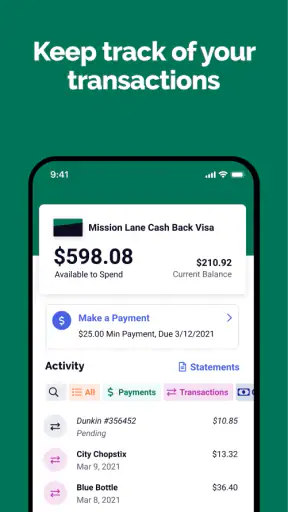
The most important speed test for a finance app is not opening it for entertainment; it is reaching useful information before a decision has to be made. A typical example is standing in a shop and wanting to check available credit, review a recent transaction, or make sure a payment has been reflected. A focused card app has an inherent benefit here because it does not need to present a broad collection of financial products before you reach the account that matters.
I would treat Mission Lane as a practical utility rather than an app that should be left open all day. Open it when you need to check the card, complete a task, or review activity, then close it. That workflow is more realistic than expecting it to replace every financial tool on your phone. The narrow purpose also helps reduce mental clutter: you are opening it with a specific question, not browsing through an entire financial ecosystem.
There is an important distinction between perceived speed and actual account updates. The interface can feel responsive while the underlying card information still depends on when a transaction or payment has been processed. I would not make a purchase and immediately assume that every balance detail has changed in the exact way I expect. For careful spending, I use the app as a current view of the account, but I still allow normal processing time before treating a new activity item as final.
The best speed habit is to open Mission Lane with one clear task in mind. Before a purchase, check the available amount you can use. After a purchase, return later to review the activity rather than repeatedly refreshing in the hope that an in-progress transaction will settle instantly. This simple habit avoids confusing a slow financial update with a slow app.
What happens during heavier use
Most people will not use a credit card app continuously. Heavy use usually arrives in short bursts: reviewing several transactions after a busy weekend, checking activity after traveling, looking over the account before a bill is due, or moving between account screens while trying to understand a charge. Those moments reveal more about an app’s usefulness than a single quick launch.
Mission Lane is best suited to these focused bursts because the job remains specific. You can approach it as a checkpoint after spending rather than as a permanent financial command center. I find that especially useful for people who prefer to separate card monitoring from broader budgeting. Instead of mixing card activity with cash accounts and savings goals, you can use this app to answer a narrower question: what is happening with this card right now?
A realistic routine would be to check the account before leaving home, use the card during the day, and review the activity once the day’s spending is finished. That gives you a cleaner picture than trying to remember every small purchase. It is also a good way to notice an unfamiliar transaction while the details are still fresh. The app cannot make a spending decision for you, but it can make the review step easier to repeat.
The trade-off is that a focused card app may feel limited when your needs become more complicated. If you want to compare several cards, track cash flow across multiple institutions, or build a detailed spending plan, you will probably need another application alongside it. Mission Lane does not become a full budgeting workspace simply because you use it often. Its value comes from staying tied to the Mission Lane card experience.
Reliability and the confidence to check your account
For a finance app, reliability means more than avoiding crashes. I want the app to be predictable, to show the account information in a way I can understand, and to help me distinguish routine activity from something that deserves attention. A card-management app earns trust through repeated, uneventful checks rather than flashy features.
Mission Lane has attracted a strong response from users, with an average rating of 4.8 from around 196 thousand ratings and roughly 10 thousand written reviews. Its reach is also substantial, with over one million installs. Those figures do not guarantee that every person will have the same experience, but they do suggest that the app has become a familiar access point for many Mission Lane cardholders.
I would still avoid treating a high rating as a promise that every account question will be solved inside the app. A mobile application can help you view and manage card information, but unusual account situations may require a different support route or more direct attention. That is not a criticism unique to Mission Lane; it is a useful boundary for any financial app. The mobile interface is most valuable for routine control and awareness, while exceptional problems may need a more deliberate follow-up.
One of my practical recommendations is to use the app as part of a repeatable review habit instead of waiting until something feels wrong. Checking activity regularly makes it easier to recognize normal purchases and spot a transaction that does not fit your memory. It also reduces the temptation to make a rushed judgment based on a single notification or a balance that has not fully updated yet.
Device constraints and what the platform support means
Mission Lane is listed for Everyone and is available as a free finance app. Its stated minimum Android requirement is version 7.0, which gives it a relatively broad starting point for Android users. That matters if you keep an older phone for practical reasons or do not replace your device frequently. You should still keep your operating system and the app itself in a healthy state, because financial tools deserve more care than casual apps.
The current version is 19.0.0, so the app is not presented as an abandoned experiment. I see that as a positive sign for someone deciding whether to make it part of a regular card routine. Version information alone cannot prove perfect stability on every handset, though. Older hardware, limited free storage, a crowded background workload, or an outdated system can all affect how any mobile finance app feels.
Resource demands are best judged by the way you use it. This is an app you open for account tasks, not something that needs to remain active while you work, stream video, or play games. Closing it after checking the card is a sensible approach if your phone is older or you are careful about battery and memory. The app’s focused role also means you do not need to keep it constantly visible to benefit from it.
When a device is struggling, I would troubleshoot in a calm order: confirm the phone meets the Android requirement, make sure there is enough storage, update the app through the normal store process, and restart the device before assuming the account tool itself is at fault. If the problem involves account information rather than the screen responding, I would separate those two issues and seek the appropriate account help rather than repeatedly reopening the app.
Useful workflows that are easy to overlook
The first useful workflow is a pre-purchase check. Before a larger or unfamiliar expense, open the app and review the card’s current position. This is more helpful than relying on memory, especially when several recent transactions are still fresh. It turns the app into a quick decision aid without pretending that it can predict how every pending item will settle.
The second is a post-spending review. Instead of checking after every tiny purchase, choose a consistent point in the day or week and look through the recent activity together. Grouping the review makes patterns easier to notice and saves you from repeatedly opening the app for no new information. If something looks unfamiliar, the timing and amount are easier to compare with your own receipts and memories when you review regularly.
The third is a recovery routine for moments when the app does not behave as expected. Do not immediately assume that a missing update means the card has been charged incorrectly, and do not assume that a delayed screen means your account is unavailable. First distinguish a display or connection problem from a transaction-processing delay. Then try the basic device checks, and keep any relevant purchase details available if you need to investigate the account through another channel.
A fourth insight is knowing when not to use Mission Lane as the main tool. If your financial life involves several cards and accounts, copying everything mentally from separate apps can create more work and more opportunities for mistakes. In that situation, a broader budgeting or banking solution may be better for the overall picture, while Mission Lane remains useful for the Mission Lane card itself. The right choice is not always one app; sometimes it is a clear division of responsibilities.
Who will get the most from it
I would recommend Mission Lane most readily to an existing Mission Lane cardholder who wants a straightforward mobile way to stay aware of card activity. It is also a reasonable fit for someone who prefers checking finances in short sessions rather than managing money from a large desktop dashboard. The free price removes a separate subscription decision, and the Everyone rating makes the app approachable for a broad audience.
It can be particularly useful for someone trying to build a consistent habit around credit-card awareness. The app does not need to be exciting to be valuable. If opening it before a major purchase and reviewing activity afterward helps you avoid surprises, that routine may matter more than a long list of extra tools.
I would be more cautious about recommending it to a person who has no Mission Lane card, expects a complete bank account experience, or wants advanced planning across multiple financial providers. For those needs, a general banking application or dedicated budget tracker may offer a better center of gravity. Using a card-specific app for a multi-account problem can leave you doing unnecessary manual work.
My performance verdict
Mission Lane succeeds because it keeps its purpose clear: it is a mobile finance app for managing a Mission Lane credit card. In my view, that focus supports a clean everyday workflow, especially when you need a quick account check, a transaction review, or a regular spending habit. Its audience size, strong average rating, free availability, and support for Android devices starting with version 7.0 all make it an easy app to consider for the cardholders it serves.
Its limitations are equally important. I would not choose it as my only financial app if I needed a complete view of multiple accounts, detailed budgeting, or broad financial planning. I would also remember that app responsiveness and account updates are not exactly the same thing; a fast screen cannot make card processing instantaneous. Those are reasonable boundaries, not reasons to dismiss the app.
After weighing speed expectations, heavier-use moments, reliability, and device demands, my conclusion is positive but specific. Mission Lane is most convincing as a dependable card companion, not as an all-purpose money manager. If that matches what you need, installing it is a practical choice. If your goal is broader financial control, pair it with a tool designed for that wider job instead of expecting one focused app to do everything.
For its intended audience, I would keep it installed and use it deliberately: check before important spending, review activity on a regular schedule, and give account updates time to settle before drawing conclusions. That approach lets the app do what it is best at while keeping your expectations realistic.
FAQ
What is Mission Lane, and who is it designed for?
Mission Lane is a financial services app focused primarily on helping users manage a Mission Lane credit card and monitor their account. It is generally designed for people who want convenient access to card details, payment tools, transaction history, and account information from a mobile device. Availability, eligibility, and specific features may vary depending on the user’s card, location, and account status.
Can I apply for a Mission Lane credit card directly through the app?
The Mission Lane app may provide access to application or account-related information, but the exact application process can depend on current offers and your eligibility. Approval is not guaranteed, and applying may involve identity verification, credit checks, and disclosure of personal financial information. Before submitting an application, review the issuer’s rates, fees, credit requirements, and terms carefully.
What can I do with the Mission Lane mobile app?
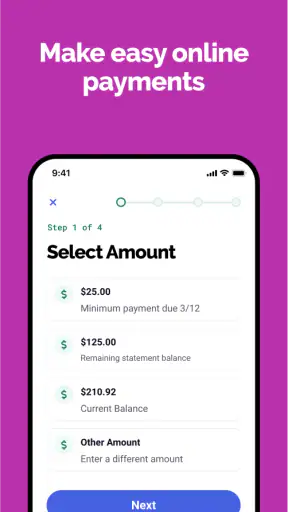
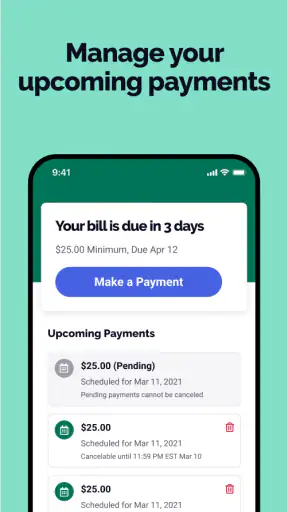
After signing in, users can typically review their balance, available credit, recent transactions, payment due dates, and account activity. The app may also allow you to make or schedule payments, manage notifications, view statements, update certain personal details, and contact customer support. Features can differ by account type, app version, and services available in your region.
Is the Mission Lane app safe to use for managing my account?
Mission Lane uses standard account-security measures such as login credentials, encrypted connections, and identity verification features to help protect customer information. However, no online service is completely risk-free. Download the app only from an official app store, keep your operating system updated, use a strong unique password, avoid sharing verification codes, and contact support promptly if you notice suspicious activity.
Are there fees or costs associated with using Mission Lane?
Using the app itself may not involve a separate download fee, but your Mission Lane credit card account can have costs such as an annual fee, interest charges, late-payment fees, or other charges depending on your agreement. Terms may vary between customers and offers. Always check your cardholder agreement, current disclosures, and billing statement so you understand the total cost before using the account.
Pros
- Simple mobile interface for checking balances and recent transactions.
- Credit-building features may help users establish a stronger payment history.
- Real-time alerts can make it easier to monitor account activity.
- Paperless account management reduces the need for mailed statements.
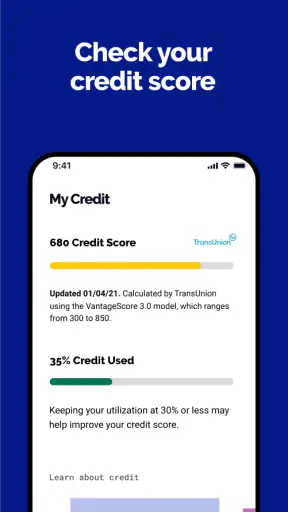
- Useful educational resources explain credit and card-management basics.
Cons
- Approval and available credit depend on individual eligibility and account review.
- Some features may require an active Mission Lane card or account.
- Customer support availability may vary outside regular business hours.
- Credit-building benefits require consistent
- on-time payments to be effective.
- Not all users may qualify for the lowest fees or most favorable terms.